
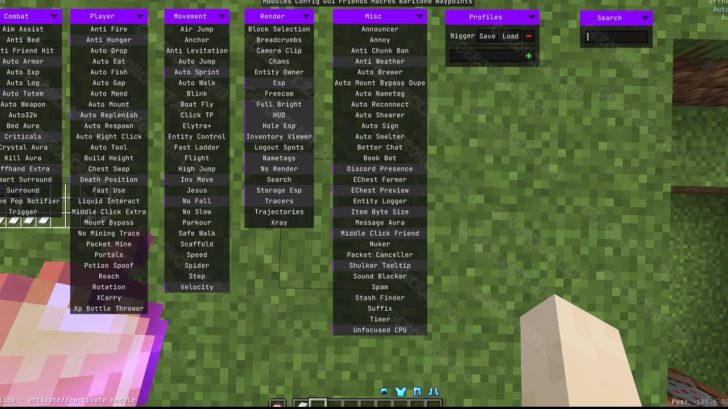
The Asteroid Cheat for Minecraft adds many useful cheats and hacks to help you survive and improve your skills. Essentially, it’s an unofficial version of the Meteor Cheat for Minecraft!
Guide:
Below is a list of modules included in this mod. Most of them share functionality with other mods on the site, so I decided they were worth keeping.
Modules marked with an asterisk (*) require Operator (OP) permissions or are used in single-player mode.
Player
-
Auto Clicker: Timed auto-clicker. Useful for farming mobs.
-
Auto Replenish: Automatically replenishes a broken tool or depleted food item on the hotbar with items from your inventory. A nice quality-of-life (QoL) improvement.
-
Auto Respawn: Automatically respawns. Automatically presses the respawn button after death.
-
Auto Tool: Automatically switches to the appropriate tool when attempting to break a block.
-
Fake Player: Fake player. Creates a fake player, visible only on the client-side. Has no practical use other than looking cool or allowing you to take a nice screenshot.
-
No Interact: Disables interaction. Allows you to “blacklist” certain blocks to prevent accidental interaction or breaking. Useful for amethyst mining.
-
No Mining Trace: Mining through entities. Allows you to break blocks, even if they’re blocked by an entity (such as a mob).
-
Portals: Portals. Allows players to open their inventory while inside a Nether portal. Honestly, it’s strange that this isn’t in the vanilla game.
-
Rotation: Rotation. Allows you to lock head rotation angles (yaw and/or pitch).
Render
-
Better Tab: Improved Tab. Customizable Tab menu improvements.
-
Better Tooltips: Improved tooltips. Preview the contents of shulkers, ender chests, etc.
-
Block ESP*: Block ESP. Draws outlines around whitelisted blocks. Helps find a specific block type.
-
Block Selection: Selects blocks. Changes the visualization of the selected block.
-
Blur: Blur. Blurs the background in some menus.
-
Breadcrumbs: “Breadcrumbs.” Draws a line behind the player, allowing them to trace their path. Useful for those who get lost easily.
-
Break Indicators: Break Indicators. Configure and improve block break indicators.
-
Camera Tweaks*: Camera settings. Configure the third-person camera. Allows the camera to pass through blocks.
-
Free Look: Free look. Allows you to lock the third-person camera and move your head freely.
-
Freecam*: Free camera. Frees the player’s camera, allowing them to fly as if in spectator mode.
-
Fullbright: Full brightness. Disables lighting (similar to night vision).
-
Hand View: Hand view. Sets the display of items in the player’s hands.
-
Item Highlight: Item highlighting. Highlights specific items in interfaces to make them easier to find.
-
Light Overlay: Lighting overlay. Displays light levels directly on blocks.
-
Marker: Marker. Displays shapes as a client-side hologram. Useful for planning buildings.
-
No Render: Disables rendering. Prevents certain elements from being drawn, such as Nether fog, particles, or even specific entities.
-
Tracers*: Tracers. Draws lines from the crosshair to selected entities. Useful for finding lost items.
-
Trail: Trail. Draws a trail of particles behind the player. Useless, but fun.
-
Unfocused CPU: Background FPS limit. Limits the frame rate when the Minecraft window is out of focus.
-
Waypoints: Waypoints. Allows you to create and save waypoints for navigation.
-
Xray*: Xray. Disables the rendering of certain blocks. Useful for finding specific resources.
-
Zoom: Zoom. Zooms in, similar to a telescope.
Misc (Miscellaneous)
-
Ambience: Atmosphere. Adjusts visual effects (such as the sky). Allows you to create strange things like Ender skies in the overworld. A purely cosmetic module.
-
Auto Reconnect: Auto Reconnect. Automatically reconnects the user to the server when the connection is lost. Useful for AFK sessions on servers with scheduled restarts.
-
Better Chat: Improved chat. Prefixes, suffixes, and filtering via regular expressions (regex).
-
Discord Presence: Discord status. Customizable Discord Rich Presence.
-
Inventory Tweaks: Inventory tweaks. Automatic item transfer, chest sorting, and moving via Shift + drag.
-
Sound Blocker: Sound blocking. Fine-tune which sounds should not be played. A great feature for people with accessibility needs.
Commands
Below is a list of Asteroid commands. They all begin with the prefix . (dot).
-
Dismount (.dismount): Forces the player to leave the vehicle.
-
Disconnect (.disconnect): Disconnects from the server.
-
Drop (.drop): Drops items from inventory.
-
Enchant (.enchant): Enchants an item. For Creative only.
-
Fake Player (.fake-player): Manage fake players.
-
Friend (.friend): Manage your friends list.
-
Help (.help): Shows a list of commands.
-
NBT (.nbt): Change an item’s NBT data. Creative only.
-
Peek (.peek): Shows the contents of a shulker or other container in your hands.
-
Ender Chest (.ec): Shows the contents of your ender chest.
-
Profiles (.profiles): Manage settings profiles.
-
Reload (.reload): Reloads Asteroid.
-
Reset (.reset): Reset specific settings.
-
Say (.say): Sends a message to Chat, allowing the use of StarScript variables.
-
Server (.server): Displays information about the server.
-
Toggle (.toggle): Toggles modules on/off.
-
Settings (.settings): Opens the module settings page.
-
Save Map (.sm): Saves the map in your hands as an image.
-
Macro (.macro): Runs the selected macro.
-
Modules (.modules): List of available modules.
-
Binds (.binds): List of assigned keys.
-
Give (.give): Gives the player an item. For Creative only.
-
Bind (.bind): Binds the module to the next pressed key.
-
FOV (.fov): Adjusts the viewing angle.
-
Rotation (.rotation): Adjusts player head rotation.
-
Waypoint (.wp): Manage waypoints.
-
Input (.input): Simulate a specific keystroke.
Macros
Asteroid allows you to create macros that These commands can be chained together. They can be used to automate tasks and assigned to hotkeys.
Requirements:
How to install Asteroid on Minecraft:
- Download and install the latest version of Fabric
- Download and place the downloaded Asteroid mod with the Fabric API in the "mods" folder. Add all the mods you need to the "mods" folder as usual. That's it!
- More details. Important! This is a licensed, free version of Asteroid, which you download from the developers' servers, and we are not responsible for its content.
Download Asteroid cheats for Minecraft (from Modrinth servers):
For 26.2 (Fabric)
- Download asteroid-0.4.1-alpha-2.jar (1.8.2026)
For 26.1.2
- Download Asteroid-client-26-1-2.jar (16.12.25)
For 1.21.11
- Download Asteroid-client-1-21-11.jar (16.12.25)
For 1.20.6
- Download Asteroid-client-1-20-6.jar (30.06.23)
how do i import this cheat into the asteriod tho